
Upload your bill of quantities. Get your programme of works.
Landed a contract that needs a programme? Comserv PM reads your bill of quantities, detailed quote or drawings and builds a full programme of works in minutes, with no training. Then it keeps the job on track: budgets, hours, site walk-rounds and your whole team in one place.
No card needed for the trial. Windows and Mac. Built by a UK contractor for UK contractors.
See it in 5 minutes
From a quote to a programme, then budgets, walk-round videos, the team and reports.
Everything a builder needs to run the job
No more spreadsheets passed around by email, and no weeks learning planning software.
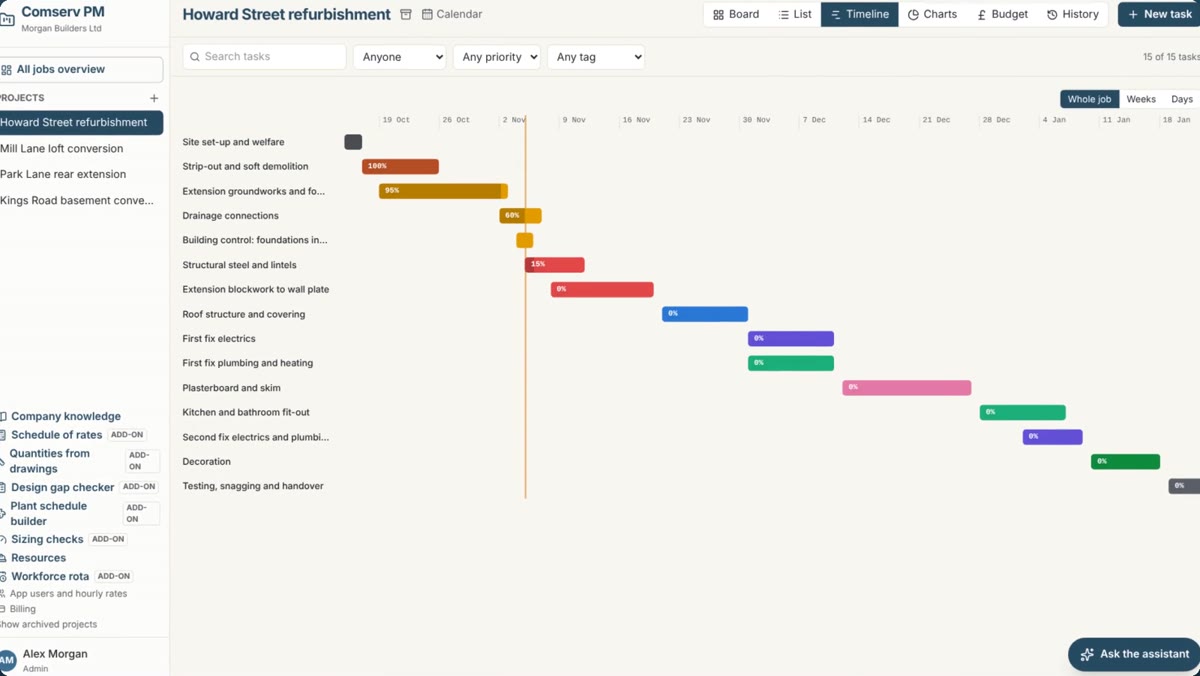
Programme from your paperwork
Attach a bill of quantities, quote, spec or photos of the drawings and ask for a programme. It learns your own output rates from your past jobs.
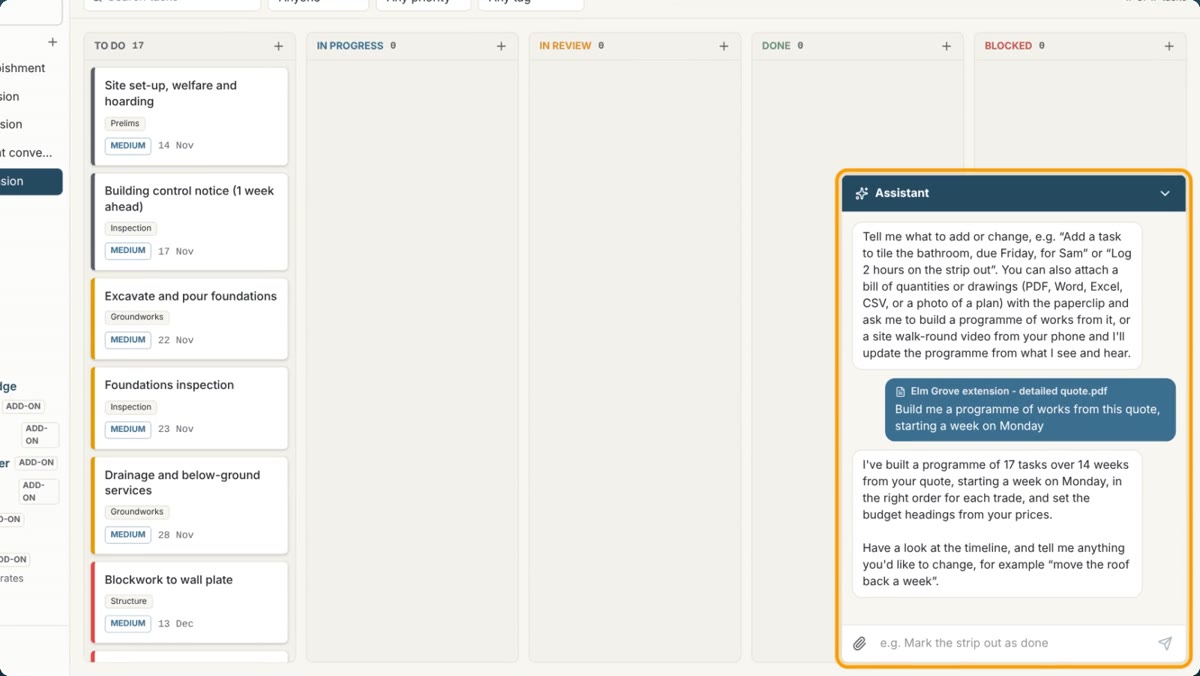
Change it by asking
"Move the roofers back a week" or "add a second gang". The assistant does it, and any change can be undone from the job's history.
Site walk-rounds
Film a walk round the site on your phone and talk as you go. The assistant updates progress, adds variations and snags, and moves dates for delays.
Budgets in pounds
Labour, sub-contract, materials, prelims and profit, with spend against budget as the job goes, so you see an overspend coming.
People and gangs
Log hours, book your gangs and sub-contractors, and get warned when someone is booked on two jobs at once. See every job on one screen.
Your whole team, and reports
Everyone sees the same jobs, live, with tasks on their phone calendar. Charts, Excel and PowerPoint reports in one click.
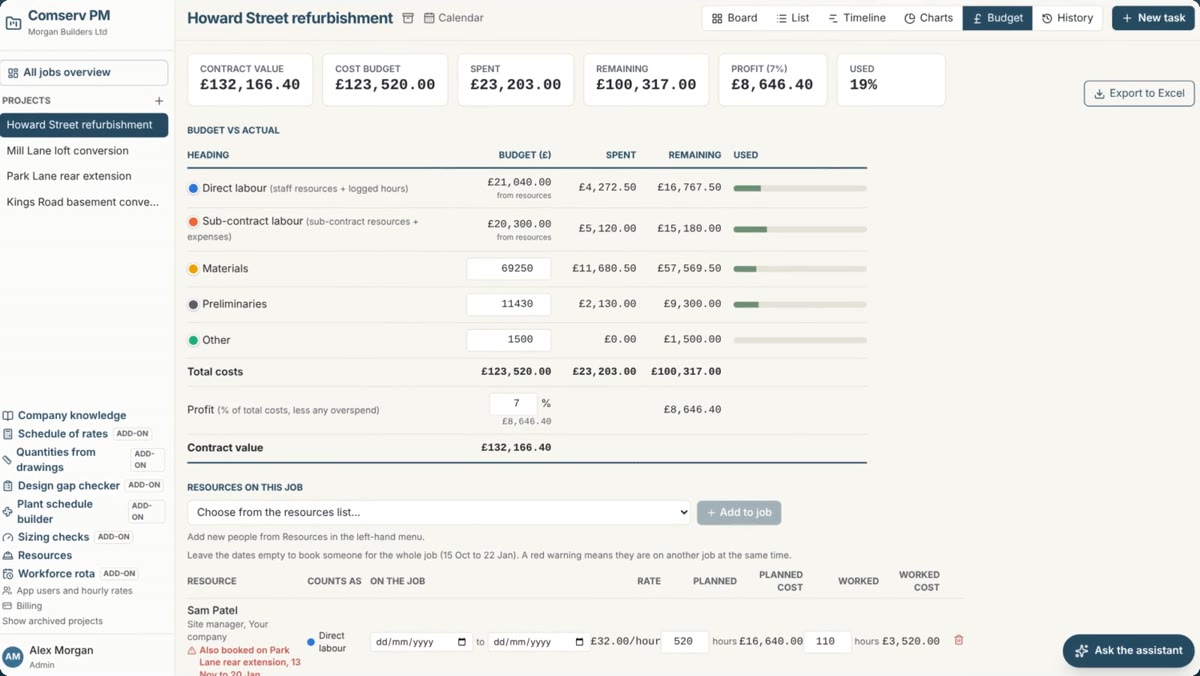
Know where the money is going
Every job has a budget by heading, and logged hours, bookings and expenses come off it as you work.
Your programme, from your quote
Attach the quote and ask. The assistant puts every trade in order with sensible durations, inspections and lead times, and fills in the budget headings. Then see it as a board, list, timeline or calendar.
Simple prices, no contract
Every plan has every main feature. Pay monthly, or yearly and get two months free. Cancel any time.
- All main features
- AI planning assistant
- 20 site walk-round videos a month
- Email support
- All main features
- AI planning assistant
- 50 site walk-round videos a month
- Email support
- All main features
- AI planning assistant
- 150 site walk-round videos a month
- Priority email support
Bolt-ons, when you need them
Add any of these to any plan from Billing inside the app, and take them off whenever you like. Each one has a short video.
Attach your drawings and the assistant measures a bill of quantities in NRM2 work sections, M&E included, from the scales, dimensions and schedules. Anything scaled or allowed for is flagged to check, and the bill turns straight into a programme.
Load your own rates book, such as the National Housing Federation schedule. Film a surveyor's walk-round and the assistant prices it room by room, with code, quantity, unit and rate. Ideal for social housing and maintenance contracts.
Shifts, nights, holidays and sickness for your people and gangs. It warns about clashes, short rest and weeks over 48 hours, and sends each worker their shifts straight to their phone.
The assistant cross-checks the schematics, plant schedules, specs and layouts and writes a numbered list of queries for the designer, before the gaps cost you on site.
Builds a plant and equipment schedule from the drawings, with ref, system, duty, size, location and power for each item. Anything without a duty is flagged to check.
Checks heat loss against radiator and emitter output, and pipe and duct velocities. The sums are worked out exactly, not guessed by the AI.
Start your free trial
Up and running in five minutes. You choose a plan from inside the app whenever you're ready.
Download
Pick Windows or Mac below and run the installer.
Create your account
Open Comserv PM, click "Create an account" and enter your company name.
Invite your team
Add your colleagues' emails under Team. They download the app and join you.
Choose a plan
Before the 30 days are up, pick a plan and any bolt-ons under Billing. Your jobs carry straight on.
Windows may show "Windows protected your PC" the first time: click More info, then Run anyway. On a Mac, if it says the app can't be opened, go to System Settings, Privacy & Security, and click Open Anyway.
Questions
Do I need a card for the trial?
No. The trial runs for 30 days with every main feature. If you choose a plan during the trial, the first payment is only taken when the trial ends.
Do I need to know planning software?
No. Attach your bill of quantities, quote or drawings and ask the assistant for a programme. You can then change it by asking, or by dragging tasks about.
What happens when the trial ends?
The app asks you to choose a plan. Nothing is deleted: your jobs, budgets and history come straight back once you've chosen.
What are bolt-ons?
Extra tools for particular kinds of work, such as measuring quantities from drawings or pricing from a schedule of rates. Add them from Billing inside the app. They're charged with your plan, monthly or yearly, and you can take them off at any time.
Can I cancel?
Yes, any time, from Billing inside the app. You keep using it until the end of the period you've paid for.
Is my data private?
Yes. Each company's data is kept separate and only your own team can see it.
How do I pay?
By card, through Stripe, the payment company used by millions of businesses. You get a receipt by email for every payment, and can download invoices from Billing.
How do I get help?
Email support@comservpm.co.uk and we'll get back to you within one working day.